Deployment Scanner returns an error showing: The non-HTTP Activation feature of .NET Framework 3.5 is not enabled
Article ID: 100058830
Updated On:
Description
Error Message
The non-HTTP Activation feature of .NET Framework 3.5 is not enabled.
Method 3: Use Windows installation media
You can use the Windows installation media as the file source when you enable the .NET Framework 3.5 feature. To do this, follow these steps:
-
Insert the Windows installation media.
-
At an elevated command prompt, run the following command:
Console
Dism /online /enable-feature /featurename:NetFx3 /All /Source::\sources\sxs /LimitAccess In this command,
is a placeholder for the drive letter for the DVD drive. For example, you run the following command: Console
Dism /online /enable-feature /featurename:NetFx3 /All /Source:D:\sources\sxs /LimitAccess
Method 4: Alternative steps for Windows Server
In Windows Server 2012 R2, you can also specify an alternative source by using Windows PowerShell cmdlets or by using the Add Roles and Features Wizard.
To use Windows PowerShell, follow these steps:
-
Insert the Windows installation media.
-
In an elevated Windows PowerShell command window, run the following command:
PowerShell
Install-WindowsFeature name NET-Framework-Core source:\sources\sxs In this command,
is a placeholder for the drive letter for the DVD drive or for the Windows installation media. For example, you run the following command: PowerShell
Install-WindowsFeature name NET-Framework-Core source D:\sources\sxs
To use the Add Roles and Features Wizard, follow these steps:
-
Insert the Windows installation media.
-
Start the Add Roles and Features Wizard.
-
On the Select features page, select the .NET Framework 3.5 Features check box, and then click Next.
-
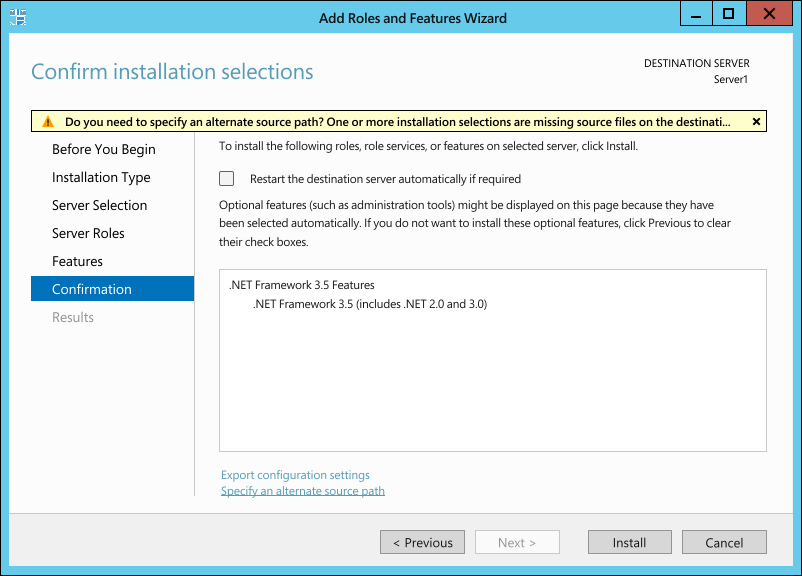
On the Confirm installation selections page, click the Specify an alternate source path link. The screenshot for this step is listed below.
-
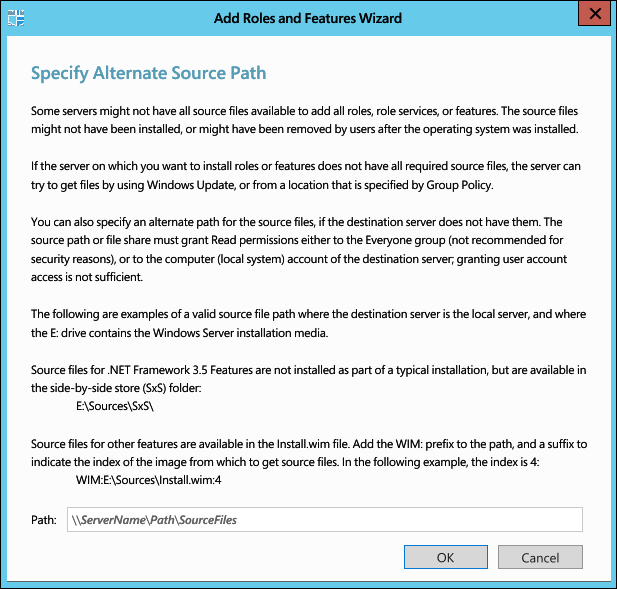
On the Specify Alternate Source Path page, type the path of the SxS folder as a local path or as a network share path. The screenshot for this step is listed below.
-
Click OK.
-
Click Install to finish the wizard.
Cause
This error can be returned if the following services are not present on the EV server:
Net.Msmq Listener Adapter
Net.Pipe Listener Adapter
Net.Tcp Listener Adapter
This can also be due to the below .NET Framework 4.X features being installed.
Message Queueing (MSMQ) Activation
Named Pipe Activation
TCP Activation
This can also be due to unknown corruption within .NET Framework 3.5.
Resolution
Remove the unnecessary features of .NET 4.X along with .NET Framework 3.5 Features from the EV server and reinstall the .NET Framework 3.5 Features.
Remove Features
- Open Server Manager on the EV server
- Click on Local Server
- From the Manage menu choose Remove Roles and Features
- Click Next to the Features section
- Uncheck .NET Framework 3.5 Features and choose Remove Features on the pop-up
- Expand .NET Framework 4.X Features > WCF Services and uncheck Message Queueing (MSMQ) Activation, Named Pipe Activation, TCP Activation
- Click Next to allow the features to be removed and reboot the server
Install .NET Framework 3.5 Features
- Open Server Manager on the EV server
- Click on Local Server
- From the Manage menu choose Add Roles and Features
- Click Next to the Features section
- Check .NET Framework 3.5 Features and ensure all boxes are checked
- Click Next to install and complete installation
- Validate the services are now present and run Deployment Scanner/EV installation
Issue/Introduction
